13 March 2026
Key Takeaways
-
Spend on high-quality, cohesive portraits to influence initial perceptions and foster credibility across your website, LinkedIn, and collateral. Opt for professional headshots, team portraits, and genuine candids that showcase your brand values.
-
Prepare your shoot with objectives, aesthetic, and wardrobing, set, and lighting checklists. Pair with a professional photographer and coach your guys for real smiles and strong posture.
-
Employ tactical photography to illuminate your company and demonstrate culture, process, and individuals. Photograph authentic moments, backstage efforts, and achievements to boost connection and trust.
-
Polish technical standards through composition, lens choice, and lighting. Make consistent post-production edits so images look cohesive across platforms and formats.
-
Define your visual identity with crisp brand guidelines, communal assets, and planned refreshes. Keep a centralized image library with tags and permissions to ease access and keep it fresh.
-
Handle your image rights concerns with model releases and usage licenses locked in from the get-go. Monitor expirations, verify rights holders, and train teams to avoid infringement and safeguard your brand.
Corporate photography is the art of capturing a company’s employees, identity, offices, and merchandise to use for commercial purposes. It includes headshots, group photos, workplace scenarios, events, and brand assets used in profiles, websites, press kits, and reports. To serve defined objectives, crews schedule shot lists, coordinate on brand aesthetics, and select lighting that matches mood, from gentle natural light to crisp studio environments. For scale and speed, crews map locations, assign time blocks, and standardize file names and color profiles. Rights and usage terms specify where and how images are displayed. With minimalist art direction and accessible styling, outcomes come off authentic and branded. Below we detail planning steps, gear selections, pricing, and file delivery.
Why Your Image Matters
Corporate photography establishes perceptions of your brand and your professionalism. In a digital-first world, images are your first touchpoint, so having great looking images on your site, LinkedIn, and pitch decks can make or break deals, trust, and long-term value. Eye-catching photos make you memorable, illustrate what you care about, and communicate your message across markets and platforms.
First Impressions
Sleek headshots and team images make an impression for new clients and partners. A crisp, well-lit head shot tells people that you care about the details. On a careers page, uniform head shots of your team can make your company appear professional and trustworthy from the initial click.
Maintain consistency of style and quality for all of your images. Use the same light, backdrop, color grade and crop ratio so your profiles, press kit and slide decks look aligned. This sounds prudent.
Pick a look that matches your brand: formal suits on a clean gray for finance, smart-casual with warm light for tech, bright, candid frames for creative fields. Use these great images at the top of your home page, on your About page, and in conference slides to hook quickly and set the narrative before the text.
In our digital era, that initial frame can engender authority and legitimacy. A professional image can be an obvious advantage when buyers compare options side by side.
Building Trust
Real, polished photos assist individuals in trusting you. Crisp images communicate that you care, and care signals competence.
Show real people and real moments: an engineer testing a prototype, a client workshop, a support team on a call. It displays openness with no trumpeting.
Executive headshots and team portraits give a human face to leadership and staff. Combine a CEO headshot with a short bio and supplement with manager portraits in the same style to demonstrate depth, not just one face.
Refresh photos frequently. New hires, new offices, and new roles should be updated within weeks, not years, to reflect current reality and continued professionalism.
Human Connection
Lifestyle and candid shots bring warmth. A silent concentration frame at a desk, a smile during a standup, or a coffee catch-up can welcome viewers.
Snap team collaboration demonstrates how work gets accomplished. Small clusters gathered around a whiteboard, lab checks, or code reviews communicate teamwork and aligned purpose.
Put in group shots and event coverage to demonstrate inclusiveness. Town halls, volunteer days, and milestone moments all help tell your story and values across geographies.
Select pictures in which there is emotion. Images can narrate, set tone, and ignite action on websites, social feeds, and brochures. This is an investment that returns across applications.
Master Your Corporate Photography
From headshots, teams, workplace stories, events, and products – corporate photography. Great photos build trust, close sales, and hire across sites, proposals, and social feeds. Make it lean, make it consistent, make it human.
-
Define goals, usage sizes, and must-have shots
-
Build a shot list with time stamps
-
Scout locations to plan light and flow
-
Buffer 20–30 minutes for setup and tests
-
Align wardrobe, grooming, and props
-
Confirm brand colors and background rules
-
Hire a photographer with a consistent portfolio style
-
Prepare backup gear, power, and tether if needed
-
Create a file plan and two-location backup
-
Set fast color and exposure correction steps
Collaborate with professional photographers who provide guidance, establish lighting rapidly, and maintain composure. Try to capture a balance of posed and candid shots. Employ light coaching so folks appear confident but not rigid.
1. Authentic Expression

Request soft smiles, easy eyes, not tense jaws. Quick prompts help: “Think of a recent win,” or “Picture a client thank-you.” This is what extracts authentic emotion without being hammy.
Avoid huge, forced grins that come across as fake in print or on screen. Get a selection of neutral, slight smile, and broader smile so you can accommodate press, bios, or pitch decks. Real trumps staged in a business context.
2. Confident Posture

Stand or sit up straight, shoulders back, chin out. Turn the torso 15 to 30 degrees off camera for shape and line.
Keep hands relaxed, either resting at your sides or on a lap. Crossed arms are acceptable only when it suits the part. Little tweaks, such as shifting weight to the back foot or dropping a shoulder, quietly add calm power without looking posed.
3. Strategic Wardrobe
Dress to match brand colors and formality. Solid colors or subtle weaves maintain attention on the visage. Skip the flashy prints and chunky logos unless they are on-brand.
Trendy fits date quick, business-casual is good when culture permits. Share a checklist: tops in brand palette, pressed, lint-free, neutral shoes, clean glasses, minimal glare jewelry. Consistency makes group grids tidy.
4. Flattering Light
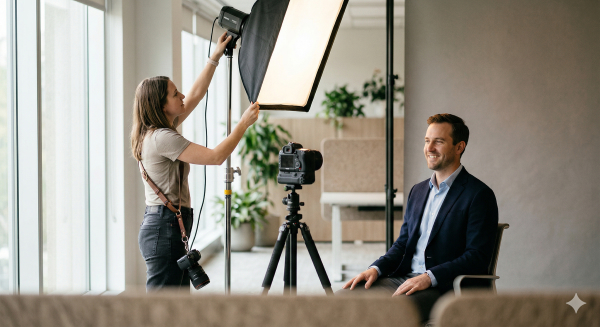
Book soft daylight when possible, or diffused key and fill to eliminate hard shadows. Test light 20 to 30 minutes prior to first portrait and tune for skin tones and wall colors.
Shift lights or flags to correct spill and lock white balance. If the color or exposure drifts, it should be correctable in a few seconds. Experiment with short light for shape or a gentle hair light for dimension.
5. Intentional Setting
Choose backdrops that resonate with your industry, such as an R&D lab, client space, or serene branded wall. Tidy up junk and rogue cords. Match the setting to the use: formal for executives and airier spaces for culture shots. Corporate work can be fresh and fun; combine a posed hero with candid work in progress. Scout first for power, noise, and lens real estate. Always maintain a live backup to a secondary drive and the cloud. In a visual-first world, bad images cost trust and revenue.
The Unseen Technical Elements
Technical decisions mold clarity, tone and brand appropriateness. Camera settings, lens, and composition establish a baseline. Planning, communication, and editing cinch it all together. There are no hidden technical factors. Contemporary equipment reduces the walls, but the aesthetic synergy and process still determine success.
|
Element |
Typical settings/use |
Why it matters |
Example |
|---|---|---|---|
|
Shutter speed |
1/125–1/250 s for posed; 1/500 s for motion |
Freeze blur in gestures |
Presenter on stage at 1/500 s |
|
Aperture |
f/2–f/4 for headshots; f/5.6–f/8 for groups |
Control depth and sharpness |
Team row at f/8 for even focus |
| ISO | 100 to 800 base to 1600 indoors | Balance noise and exposure | office window at ISO 400 | Lens | 50 to 135 mm for individuals, 16 to 35 mm for wide shots, control distortion and context, boardroom at 24 mm, CEO at 85 mm | Composition | Thirds, leading lines, negative space | Help guide eye and brand focus | Product on thirds with space for copy |
Composition
Punch up your image, use the rule of thirds, and keep faces and key props off center. Leading lines from hallways, rails, or desks direct the eye to the subject. Negative space provides breathing room for copy blocks on web or print, and it soothes cluttered scenes.
Frame to demonstrate context yet avoid clutter. Add role or industry suggestive tools, screens or architecture but crop out branding competition and visual clutter.
Head shots are most effective with clear backgrounds and minimal angles. Team photos require staggered rows and even spacing. Candid shots, which benefit from off-axis angles and foreground elements, gain energy. Special perspectives, such as a low angle on a product demo or reflection in glass, bring scenes to life and prevent galleries from seeming flat.
Lens Choice
Choose 85 to 135 mm for portraits to flatter features and prevent warp. For groups in tight rooms, 24 to 35 mm assists, but keep people close to center to minimize edge stretch.
Prime lenses (35 mm, 50 mm, 85 mm) provide razor-sharp detail and buttery bokeh for profile photos or hero banners. Wide zooms (16 mm to 35 mm) reveal architecture and laboratories with clean lines.
Match lens to task: A 100 mm macro is suitable for product texture, a 70–200 mm lens works well for events at a distance, and a 24 mm lens is ideal for environmental scenes. Technical virtuosity is used to construct genuine obstacles—consider Edward Weston and 8×10 view cameras—but contemporary implements provide professional outcomes on sleeker budgets.
Post-Production
Color balance skin tones, match contrast and maintain white points across the entire collection. Tiny retouching includes flyaway hair, dust, and exit signs while maintaining pores and fabric texture.
Crop for web, LinkedIn and print in metric sizes, then export RGB and CMYK as required. File names and folders matter; a well-organized delivery saves teams time.
Camera operation is one-fifth of success. The remainder is organizing, matching style to client preference, and consistent correspondence with assistants, stylists, and MUAs. That process can stock a content library for months. A transparent IG or LI display competence and a dependable, human brand voice.
Weaving a Visual Story
Effective corporate photography tells a compelling, human story that resonates with your audience. In our impatient digital world, visual storytelling aids people in understanding complicated concepts quickly. A picture tells a thousand words, so a tight edit counts. Think in stories, not isolated photos.
-
Core themes: people, place, process, purpose, impact
-
Elements: Portraits, candid moments, workspace details, product or service in use, data or artifacts.
-
Mix: hero images, medium frames, close-ups, and environmental shots
-
Outcomes: clarity, emotion, recall, and trust
Capturing Culture
Capture team moments, celebrations, and company events. Let people see what it feels like to work there on a day-to-day basis. Cover stand-ups, cross-border calls, volunteer days, and product launches. Weave a visual story framed by wide shots for scale, mid shots for context, and tight detail, including hands, badges, and tools.
Don’t forget to mix in some candid shots of people in actual flow — whiteboard sketches, code reviews, lab tests, coffee chats. Say no to fake grins. Look for natural light and clean backgrounds. Seek permission when appropriate and record names, roles, and places.
Showcase design traits that set you apart: flexible spaces, local art, sustainable features, or accessible layouts. Snag rituals such as welcome kits, demo Fridays, or cultural festivals to make the brand more human.
Weave a visual narrative. For instance, multi-discipline sprints demonstrate teamwork. Open doors and welcoming signage speak of acceptance. Prototypes on a bench gaze curiously.
Showcasing Process
Weave a visual story. Document workflows, meetings, and behind-the-scene steps to emphasize expertise. Map the start-to-finish arc: intake, planning, build, test, delivery, and follow-up.
Weave a visual narrative: Take step-by-step images of product development or service delivery. Think storyboard: problem, approach, tools, quality checks, outcome. Weave a visual story well captioned to simplify the complex.
Highlight employees doing their magic. Technicians calibrate sensors, consultants map journeys, and nurses set up devices to demonstrate expertise and compassion.
Build credibility by including process images in your decks, case studies, and investor reports. Pair them with metrics in metric units and quick-scan labels.
Highlighting People
Concentrate on individual and group portraits to represent talent and diversity across roles, seniority, and regions. Prefer plain light, neutral backdrops and consistent framing for a neat system.
Spotlight leadership and key staff to add a human face to strategy. Include one line role summaries and focus areas.
Rotate featured employees across web galleries and social posts on a regular schedule to remain fresh.
Weave in a visual story through short testimonials next to portraits to add voice and proof. Make quotes specific, audience aware, and plain.
Scaling Your Visual Identity
A consistent photography strategy holds your brand together as you scale. Start with strategy: define personality, values, audience, and how images should make people feel. Scaling your visual identity is important because consistent visuals can increase brand visibility by 3.5 times, increase engagement by as much as 70 percent, and increase conversions by 45 percent. The details count.
Team Consistency
Schedule your headshot sessions by location and team so lighting, lens selection, and backdrop are consistent. Use the same key light angle, the same color temperature at 5,600 K, and a neutral backdrop such as mid-grey or soft white. That locks style across sites.
Share a plain wardrobe guide: solids, no loud prints, avoid pure white near bright lights, and keep brand hues as accents only. Provide three pose options: facing the camera, 45-degree turned, and seated, so pages are consistent but human.
Appoint a coordinator to handle standards, scheduling, and new-hire shoots within 30 days. They ought to maintain a barebones checklist and sign off on final edits. Check team pages every quarter. Swap out leavers, add joiners, and reshoot when hairstyle, glasses, or roles change.
Brand Guidelines
|
Element |
Standard |
Notes |
|---|---|---|
|
Color |
1–3 main colors; 2–4 secondary |
Keep WCAG contrast for text overlays |
|
Type |
1 primary, 1 secondary |
Use same pair in captions/graphics |
|
Mood |
Clean, candid, confident |
Avoid heavy filters |
|
Lighting |
Soft, even, 5,600 K |
No mixed color casts |
|
Crops |
4:5 for profiles; 16:9 for banners |
Leave safe space for copy |
|
Resolution |
Min 3000 px on long edge |
300 ppi for print |
|
File names |
dept_role_name_YYYYMMDD.jpg |
Use lowercase, hyphens |
|
Orientation |
Headshots vertical; scenes horizontal |
Keep horizon level |
Pass this guide on to any photographers and teams. Train staff to adhere to it. Documented guidelines keep everyone in sync. Add example images: one approved headshot, one team scene, and one product close-up. Good looking, genuine shots create confidence. Sixty percent of shoppers spend more after seeing actual product images.
Asset Management
Manage with a DAM tool that has version control, web previews, and share links. Store only approved images and label usage rights and expiration dates.
Tag by department, project, person and location for quick search. Use campaign tags such as "Q3-launch" or "EU-press.
Set role-based access so sensitive work remains secure. Check quarterly and archive old portraits and stale product shots. Refresh frequently. New, on-brand photos stay current and can increase conversions by as much as 40% while a compelling image cements sentiment and devotion.
Navigating Image Rights
Navigating image rights: having clear rules on who owns photos, who can use them and where they can appear minimizes risk and saves time. Most photos satisfy copyright’s minimal threshold for originality, so rights are automatic. Days ago, I offered you some practical advice on how to avoid an image rights nightmare.
Model Releases
Have employees, contractors, and guests sign releases before or at the shoot. This is primarily relevant for headshots and leadership portraits on corporate sites, press kits, and annual reports.
Explain the use in plain words: internal newsletter, careers page, paid ads, or outdoor billboards. Remember countries, languages, and time. Provide an opt out for sensitive situations.
File releases in a central system with searchable tags by name, date, and campaign. Associate each image ID with its release. Update if privacy laws or company policies change and renew consent after role changes or when usage extends to new media.
Photographers need permissions, too, to safeguard themselves and maintain client confidence. This common practice trims fights when images reappear years down the road.
Usage Licenses
Define scope in the contract: media (web, print, social, OOH), geography (global or regional), term (e.g., 36 months), and edits allowed. Specify whether use includes organic posts, paid ads, or resale.
Keep tabs on expiration dates. Pull or swap assets when licenses expire to prevent claims. Use a dashboard that flags images 90 days before expiry.
For big campaigns, try to negotiate extended or exclusive rights. Non-exclusive means the photographer can license the same image to others. Exclusive blocks that, usually at higher rates. License means you can use it. Assignment means you own it. If it’s work-made-for-hire, make sure the contract uses the required legal language because it impacts who is the author and owner.
Copyright Basics
Confirm who owns each file under the agreement: creator, employer (work-made-for-hire), or assignee. Credit the photographer where terms dictate, including online alt text and print captions.
Register key brand images and engage in stock photography. Registration bolsters enforcement and possible remedies. Fair use may apply, but consider all four factors. Don’t depend on it for promotion.
Keep an eye on abuse with easy web searches or watching tools. Dispatch notices or claims when necessary. Remember that owners have an automatic termination right for exclusive transfers after 35 years, so they can mess up long-term plans.
Conclusion
Hard-hitting corporate photos get things done. They establish strong signals, build confidence and support your branding claim. Care faces bright light shows talent. Fine files rock on large screens and tiny feeds. Little steps add up quickly. A quick brief, a site check, a test frame, and rights in writing. That strategy saves time and cash.
To stay ahead, construct a little style guide. Camera name, lens selections, lighting atmosphere, cropping guidelines, and filenames. Attach a couple of sample shots for each use. For quick victories, update headshots, repair brand backdrops, and color coordinate across teams. See what sticks. Monitor click rate, time on page, and bounce.
Looking for a little assistance or a new perspective? Contact me and tell me your objectives.
Frequently Asked Questions
What is corporate photography, and why does it matter?
Corporate photography features your people, product, and culture. It cultivates trust, reinforces your branding, and increases engagement on websites, reports, and social media. Great images make you memorable and make prospects pick you.
How do I prepare my team for a corporate photo shoot?
Include a defined brief, dress code, and schedule. Opt for solids and minimal patterns. Match grooming to brand. Please give location info and timing. Give yourself padding. Have a coordinator to keep things flowing and on schedule.
What technical elements should I look for in a photographer?
Inquire about lighting, color fidelity, lenses, and reserve equipment. Make sure they have experience with indoor and outdoor shoots. Confirm file types, retouching pipeline, and delivery specifications. Scan portfolio for variety and consistency. Ensure safe storage and metadata.
How can corporate photos tell a strong brand story?
Schedule a shot list related to brand values. Be natural. Grab genuine moments, collaboration, and true settings. Try to use the same styling, angles, and lighting. Vary portraits, details, and wide shots. Maintain your story everywhere.
What file formats and sizes do I need for different uses?
For print, ask for high-resolution files in TIFF or high-quality JPEG format. For web, request optimized JPEG or WebP with smaller file sizes. For social, follow platform dimensions. Always keep master files for future needs.
How do image rights and usage licenses work?
Licenses outline where, for how long, and to what extent you can use images. Explain media, territories, and length. Be sure to obtain model and property releases as appropriate. Make sure rights span current and future channels. File all contracts.
How often should we update our corporate imagery?
Update photos every 12 to 18 months, or following major updates such as new c-suite, rebrands, product launches, or office relocations. Frequent refreshes assure your brand looks up to date and believable and on target in your market.
Not were you not looking for? Discover more resources and services from Andrew Shaw Photography designed for real estate, construction, and commercial marketing.
Product and Branding Photoshoots
For more background on photography, visit these authoritative resources to learn more: